Technician App
Your technicians' entire day, in their pocket
Techs see their jobs, navigate to the address, update statuses, attach photos, build estimates, and collect payments — everything syncs to the office instantly.
No credit card required
Everything on one screen
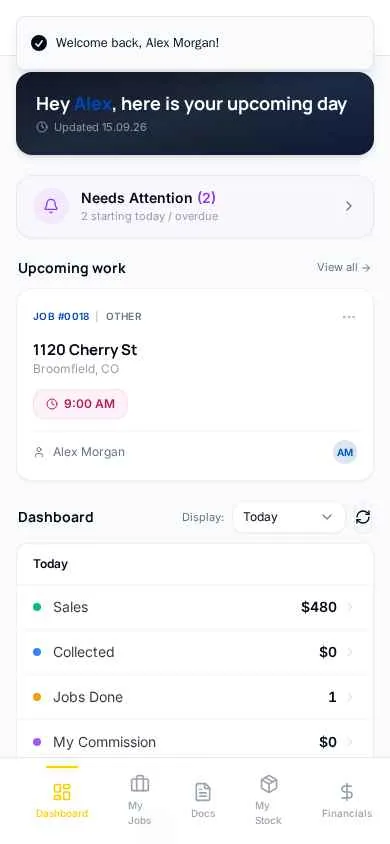
Today's jobs, upcoming work, and alerts — techs open the app and know exactly where to be.
One-tap navigation
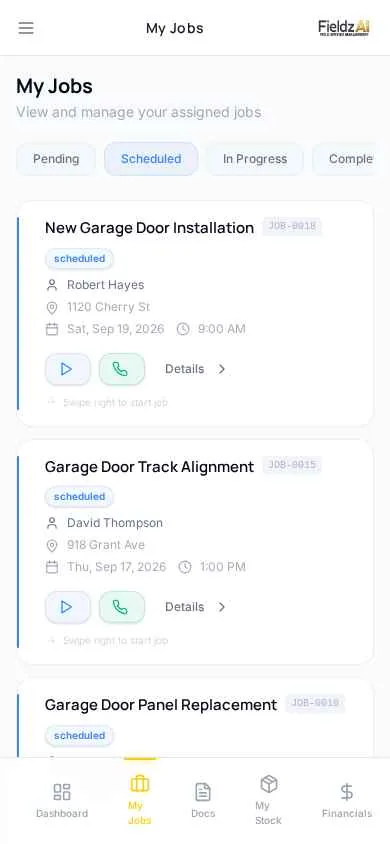
Full service addresses with Google Maps and Apple Maps buttons on every job.
Photos & notes from site
Job photos and notes upload from the field and appear in the office in real time.
Earnings visibility
Techs see their own sales, commissions, and settlement history — no more end-of-month surprises.
What you can do with technician app in Fieldz AI
Technician App — frequently asked questions
How do technicians get access?
Send an SMS invite from the Technicians page. The tech taps the setup link, creates a login, and immediately sees their assigned jobs.
Can I control what technicians see?
Yes — granular permissions govern customer phone visibility, pricing, financials, status changes, and more, per technician or account-wide.
Can techs take payments?
Yes — technicians collect card payments through the portal with Stripe. Funds go to your business account, and the invoice updates instantly.
Works even better with
Dispatch
Dispatch software for field service: assign the right technician, notify them by SMS and push, and track job progress in real time across your team.
Learn moreCall Masking
Protect technician privacy and your customer relationships: techs call customers through your business number with PIN-secured call masking.
Learn morePayments
Take card payments online or in the field with Stripe-powered processing: text-to-pay links, technician collection, deposits, tips, and automatic reconciliation.
Learn moreTry technician app free for 7 days
Every Fieldz AI plan includes the full platform — no add-ons, no feature gates.
No credit card required